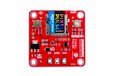
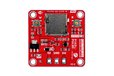
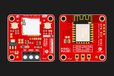
Made for This Pixel LED Creativity — Design Pixel LED Art Like a Pro!
Designed by Quantum LABS (LK) in Sri Lanka
Buy with confidence.
Our Tindie Guarantee protects your purchase from fraud. Learn More
Advanced Pixel LED Controller 2048 Max LEDs & 5 Software Support with WiFi This is not an ordinary fixed-pattern controller. If you have an idea for creating pixel LED patterns in different shapes, s…
Read More…This is not an ordinary fixed-pattern controller. If you have an idea for creating pixel LED patterns in different shapes, such as circles, squares, hexagons, or triangles, you can design them using this controller. Simply add the pixel LEDs, create the wiring diagram in the software, and easily control the patterns as you wish.
No coding skills required to create patterns!
Using any of these software tools, you can create your own beautiful patterns. Trust me, it's fun and truly enjoyable. If you have creative ideas, this is the best controller for Pixel LEDs.

Working with this controller is simple: Create your design using the software, generate the design file, copy it to the SD card, insert it into the controller, and enjoy the art you’ve created!
Or, if you prefer, you can upload your design file directly via the controller’s Wi-Fi; no need to remove the SD card.
If you’re not interested in using an SD card? Wait, we have something better! Our Pixel Pulse PRO Controller includes an in-built flash IC. Using Wi-Fi, you can directly upload your pattern files to the controller. Just simple and easy! :D
Using the controller’s Wi-Fi, you can adjust your LED count, brightness, play speed (FPS), LED model, and color order (RGB, GRB). You can also set these configurations using an SD card text file, whichever method you prefer.
This controller supports WS2811, WS2812, WS2812B / WS2812X, standard 800 kHz pixel protocols, and older 400 kHz signal types used by many Pixel LEDs.
If you have a different type of Pixel LED model, feel free to message me, I’m ready to customize the controller to match your LED specifications. (no extra cost)

First, insert the SD card into the controller and properly connect your Pixel LED bulbs or strips to 5V, GND, and the Data Line. Then, supply DC 5V, and when the PWR LED lights up, you can confirm that power is correctly supplied.
If a valid SD card is inserted, the STS LED will blink rapidly, indicating that it is reading the pattern file.
If you are using a Pixel LED strip or a string of Pixel LEDs, make sure to use a power supply capable of providing the appropriate current. The current required may vary depending on the number of LEDs you are using and the brightness level of the lights.
When you are using a large number of LEDs, make sure to provide additional 5V and GND power injections at different points. If you power the LEDs from only one side, the voltage will drop by the time it reaches the far end, and the LEDs will not receive enough power.

If you face any issues related to power distribution or wiring, feel free to contact me. I’m here to help.
When you power up the controller and check the available Wi-Fi networks on your smartphone or computer, you will see a network named "Pixel-Pulse-Mini-200". You can connect to it by entering the password "pixelmini".
After connecting, go to 192.168.10.1 in your web browser to access the control interface.

Through this interface, you can select the type of Pixel LED you are using and adjust other settings, then save them.
A special option called “File Hide” allows you to hide the pattern files you create. If this is set to YES, the pattern files you place on the SD card will be hidden from normal file explorers. However, the controller can still read them without any issue.
Below, you will also see a list of the pattern files currently on your SD card. If needed, you can upload new pattern files directly to the SD card via Wi-Fi from this interface.
If you want to connect the SD card to your computer and create pattern files and settings, follow this method:
Connect your SD card to your computer. If you have previously inserted the SD card into the controller and configured it through Wi-Fi, you will see several files already created. Here, "ANI-14x41.dat" is a pattern file I previously created using the LED Build software for a 14×41 matrix. The "pixel-pulse-mini-config.txt" file at the bottom contains the settings you configured earlier.

If you are using a new SD card, none of these files will exist. Therefore, copy the pattern file you created using your software into the SD card. Then, create a text file with the same name format shown in the image above and add your settings inside it, and save it.


Holding the WFS (W) button for 5 seconds enables or disables the Wi-Fi function. When holding the button for 5 seconds, if a pattern is currently running, it will stop, indicating that the Wi-Fi ON/OFF action will take effect. You can then release the button.
Holding the WFS (W) button for 10 seconds will reset all your customized settings back to the original factory defaults. The pattern files you previously added will not be deleted during this process.
The Reboot (R) button allows you to restart the controller.
| Parameter | Value |
|---|---|
| Input Voltage & Current | 5V Only – 500mA |
| Maximum LEDs Supported | 2048 |
| Supported LED Types | WS2811, WS2812, WS2812X, Common-800kHz, Common-400kHz |
| SD Card | FAT32 – Max 16GB & Some 32GB Cards |
| Communication | Wi-Fi |
| Dimensions | 40mm x 40mm |
| Operating Temperature | -20°C to +60°C |

Buy with confidence.
Our Tindie Guarantee protects your purchase from fraud. Learn More

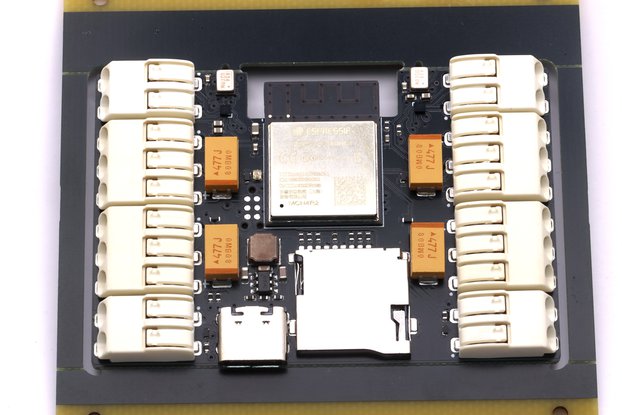
/i/093581/products/2025-11-23T14%3A12%3A26.333Z-pixel%20pulse%20v3%20with%20sd.jpg?1763878426)