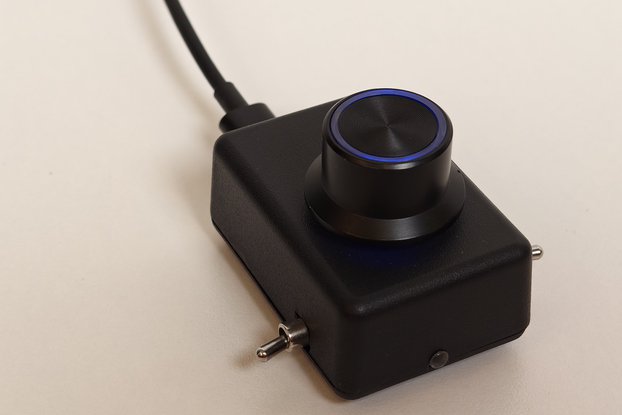
MT32-PI (MT-32 Emulator) Synthesizer, Full Build, 32GB, Designed for Musicians
Designed by HobbyChop in United States of America
Buy with confidence.
Our Tindie Guarantee protects your purchase from fraud. Learn More

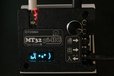
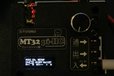
Introducing the MT32-Pi, hand-crafted, fully assembled, and ready to use. Featuring true bare-metal hardware for outstanding sound quality. Unlike other MT32-Pi units that simply replicate the origin…
Read More…Introducing the MT32-Pi, hand-crafted, fully assembled, and ready to use. Featuring true bare-metal hardware for outstanding sound quality. Unlike other MT32-Pi units that simply replicate the original code, the MT32-Pi-HC builds upon it with meaningful enhancements and additional features. Compact, lightweight, and incredibly powerful, it’s designed for serious audio enthusiasts and musicians who want more than the basics.
Ready to plug in and play, designed for musicians. Compact form factor.
Better latency and faster than the devices built with the Pi Zero 2 W!
40% faster CPU speed! 4 x 1.4 GHz vs. 4 x 1 GHz.
More features than BulkyMIDI-32 and half the size!
This unit does NOT require a mister FPGA and is fully standalone!
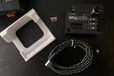
Assembled Parts Include
Raspberry Pi 3 A+
32GB SD Card
Custom MIDI "hat"
Long Micro USB Cable for Power
Full Custom Shell
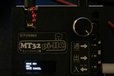
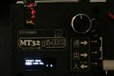
Rotary Dial and 2 Buttons for switching between Sound fonts or ROMS.
LCD Screen
High Quality Audio out DAC
TRS Type A MIDI (in, out, thru)
TRS 3.5mm Cable
A Stand
Does not include
Power brick - I recommend a 3 amp USB brick.
New features:
MIDI Channel Settings Menu
Press the encoder knob to access the MIDI channel settings menu where you can:
Channel: Select MIDI channel (1-16)
Mute: Toggle channel mute on/off
Volume: Adjust channel volume (0-127)
Program: Change program/patch number (0-127)
Route: Route channel to different output channel
Next: Navigate to Animation Settings menu
Exit: Return to normal display
Animation Settings Menu
From the MIDI Channel Settings menu, select "Next" to access animation settings:
Mode: Choose visualization mode:
BarGraph: Classic MIDI activity bar graph (default)
Animation: Cute face animations that react to MIDI
Asteroids: MIDI-reactive asteroids game with AI ship - notes spawn asteroids
MatrixRain: Matrix-style falling characters that react to note velocity
Oscilloscope: Real-time waveform display with MIDI-triggered waves
Next: Navigate to Preset Menu (save/load MIDI channel configurations)
Back: Return to MIDI Channel Settings menu
Exit: Return to normal display
FX Settings Menu (SoundFont Mode Only)
Per-Channel FX Controls:
R Button: Opens Reverb Settings (global reverb parameters)
C Button: Opens Chorus Settings (global chorus parameters)
Ch: Select MIDI channel (1-16)
Rv: Reverb send level for selected channel (0-127, CC 91)
Chr: Chorus send level for selected channel (0-127, CC 93)
Pn: Pan position for selected channel (0-127, 64=center, CC 10)
Ex: Expression level for selected channel (0-127, CC 11)
Back: Return to MIDI Channel Settings menu
Next: Navigate to Animation Settings menu
Exit: Return to normal display
Reverb Settings (Press R):
Global reverb parameters that affect the entire reverb unit:
Rm: Room Size (0-100) - Controls the perceived size of the reverb space
Dp: Damping (0-100) - High frequency absorption, higher values = darker reverb
Wd: Width (0-100) - Stereo width of the reverb effect
Lv: Level (0-100) - Overall reverb output level
Back: Return to FX Settings menu
Exit: Return to normal display
Chorus Settings (Press C):
Global chorus parameters that affect the entire chorus unit:
Dp: Depth (0-210) - Intensity of the chorus modulation (maps to 0.0-21.0)
Sp: Speed (1-50) - Modulation rate in Hz (maps to 0.1-5.0 Hz)
Lv: Level (0-100) - Overall chorus output level (maps to 0.0-10.0)
Vc: Voices (0-99) - Number of chorus voices
Back: Return to FX Settings menu
Exit: Return to normal display
All three new visualization modes (Asteroids, MatrixRain, Oscilloscope) are fully MIDI-reactive and respond dynamically to incoming MIDI notes.
Persistent Settings
The device now remembers your preferences across reboots:
Last selected visualization mode - Your chosen animation mode is saved automatically and restored on boot Last used SoundFont - The device remembers which SoundFont you were using and loads it automatically on next boot These settings are stored in separate state files on the SD card and persist through power loss.
This device not only mimics the MT-32’s signature sound but also supports soundfont emulation for a variety of soundfonts. Experience classic retro audio with this solution, which delivers authentic MT-32 and general MIDI sounds while costing considerably less than the original hardware. It can be easily connected to new or older computers equipped with MIDI out.
Can play Soundfonts with a MIDI keyboard in fluidsynth mode (default). Use up to 16 MIDI channels with up to 128 programs. Comes with a variety of .sf2 soundfonts or use your own by adding them to the soundfonts folder. MT32-Pi-HC Code
Special thanks to the original author of MT32-Pi: d0pefish
No country selected, please select your country to see shipping options.
No rates are available for shipping to .
Enter your email address if you'd like to be notified when MT32-PI (MT-32 Emulator) Synthesizer, Full Build can be shipped to you:
Thanks! We'll let you know when the seller adds shipping rates for your country.
| Shipping Rate | Tracked | Ships From | First Item | Additional Items |
|---|---|---|---|---|
|
:
|
Items will ship 1-3 days after purchase.
Buy with confidence.
Our Tindie Guarantee protects your purchase from fraud. Learn More
By clicking Register, you confirm that you accept our Terms & Conditions
We recognize our top users by making them a Tindarian. Tindarians have access to secret & unreleased features.
We look for the most active & best members of the Tindie community, and invite them to join. There isn't a selection process or form to fill out. The only way to become a Tindarian is by being a nice & active member of the Tindie community!